Menu API in Drupal 10
Menus are an essential part of any website. They make navigation easy, help users find content, and are important for the overall user experience. In Drupal 10, the Menu API lets developers create, customize, and manage menus through code. This gives you complete control over how navigation functions on your site.
In this blog, we will look at what the Menu API is, how it works, and practical examples of using menus in Drupal 10.
What is the Menu API in Drupal 10?
The Menu API provides functions and hooks that allow developers to:
Define menus and menu links.
Control visibility, access, and routing of links.
Alter existing menus or dynamically add items.
In Drupal, menus are stored as configuration entities, and menu links are provided either as config or code via .links.menu.yml files.
Types of Menus in Drupal 10
Main navigation menus (Primary site navigation)
Administrative menus (Used in admin UI)
Custom menus (Created for special requirements)
Defining Menu Links in Drupal 10
Menu links are usually defined inside a .links.menu.yml file in your custom module.
Example: Defining a custom menu link in a module
my_module.links.menu.yml
my_module.custom_page:
  title: 'Custom Page'
  description: 'A link to my custom page.'
  route_name: my_module.custom_page
  parent: system.admin_content
  weight: 10
title - The label of the link shown in the menu.
description - Tooltip text.
route_name - The route (defined in
my_module.routing.yml).parent - Places the link under another menu item.
weight - Controls ordering of menu items.
Creating a Custom Route for the Menu Link
my_module.routing.yml
my_module.custom_page:
  path: '/custom-page'
  defaults:
    _controller: '\Drupal\my_module\Controller\CustomController::content'
    _title: 'Custom Page'
  requirements:
    _permission: 'access content'
Now, when you clear cache, Drupal will automatically add "Custom Page" under the Content menu.
Creating a Custom Menu Programmatically
Sometimes you need a new menu (not just a menu item). You can create one programmatically in hook_install().
my_module.install
use Drupal\system\Entity\Menu;

/**
 * Implements hook_install().
 */
function my_module_install() {
  if (!Menu::load('custom-menu')) {
    Menu::create([
      'id' => 'custom-menu',
      'label' => 'Custom Menu',
      'description' => 'A menu created programmatically.',
    ])->save();
  }
}
After installation, your new menu will be available in Structure → Menus.
Altering Existing Menus
You can change existing menu links using hook_menu_links_discovered_alter().
Example:
/**
 * Implements hook_menu_links_discovered_alter().
 */
function my_module_menu_links_discovered_alter(&$links) {
  if (isset($links['my_module.custom_page'])) {
    $links['my_module.custom_page']['title'] = 'Updated Page Title';
  }
}
This updates the menu link title dynamically.
Always define menu links in
.links.menu.ymlfor consistency.Use routes and permissions to control access.
Keep menus structured and avoid too many nested items.
Use Drupal’s caching system to improve performance.
Test menu visibility for different roles and permissions.
The Drupal-10 Menu API offers developers a very powerful mechanism for defining and managing navigation in-site programmatically. From adding new admin links to custom menus or alterations of any other menus-that is all in your hands with the Menu-API.
With the use of menu hooks, YAML definitions, and configuration entities, you will be able to have clean, well-structured navigation for your Drupal project that is also easy to use.
Programmatically Creating Multi-level Menus in Drupal 10
In Drupal, menus are often managed through the UI; nonetheless, if you want to create some complex setup or something reusable, you can always define the menus programmatically through an update hook or installation script. The following example shows you how to create multi-level hierarchical menus programmatically with the MenuLinkContent entity.
This works great when:
You want to provide default navigation structure in a custom module.
You need nested menus (up to 3–4 levels).
You want consistent menu setup across environments without manual UI configuration.
Example: Creating Nested Menus with Update Hook
use Drupal\menu_link_content\Entity\MenuLinkContent;

/**
 * Create hierarchical menus programmatically.
 */
function mymodule_update_9001() {
  // Define a nested array of menu items.
  $menu_items = [
    'Main Menu' => [
      'Section One' => [
        'Subsection 1' => [
          'item-1' => 'Menu Item 1',
          'item-2' => 'Menu Item 2',
        ],
        'Subsection 2' => [
          'item-3' => 'Menu Item 3',
        ],
      ],
      'Section Two' => [
        'item-4' => 'Menu Item 4',
      ],
    ],
  ];

  $weight = 1;
  $menu_name = 'main';

  // Loop through the array and create menu links.
  foreach ($menu_items as $top_title => $top_children) {
    $parent1 = MenuLinkContent::create([
      'title' => $top_title,
      'link' => ['uri' => 'internal:#'],
      'menu_name' => $menu_name,
      'expanded' => TRUE,
      'weight' => $weight++,
    ]);
    $parent1->save();
    $parent1_id = $parent1->getPluginId();

    foreach ($top_children as $second_title => $second_children) {
      if (is_array($second_children)) {
        $parent2 = MenuLinkContent::create([
          'title' => $second_title,
          'link' => ['uri' => 'internal:#'],
          'menu_name' => $menu_name,
          'parent' => $parent1_id,
          'expanded' => TRUE,
          'weight' => $weight++,
        ]);
        $parent2->save();
        $parent2_id = $parent2->getPluginId();

        foreach ($second_children as $path => $label) {
          $menu_link = MenuLinkContent::create([
            'title' => $label,
            'link' => ['uri' => 'internal:/' . $path],
            'menu_name' => $menu_name,
            'parent' => $parent2_id,
            'weight' => $weight++,
          ]);
          $menu_link->save();
        }
      }
      else {
        $menu_link = MenuLinkContent::create([
          'title' => $second_children,
          'link' => ['uri' => 'internal:/' . $second_title],
          'menu_name' => $menu_name,
          'parent' => $parent1_id,
          'weight' => $weight++,
        ]);
        $menu_link->save();
      }
    }
  }
}
Key Points:
MenuLinkContent::create()is used to generate new menu items.Use
internal:#for placeholders (non-clickable parents).The nested loop ensures hierarchy (Parent → Child → Grandchild).
Replace
mainwith your own menu machine name.Weights ensure correct ordering of items.
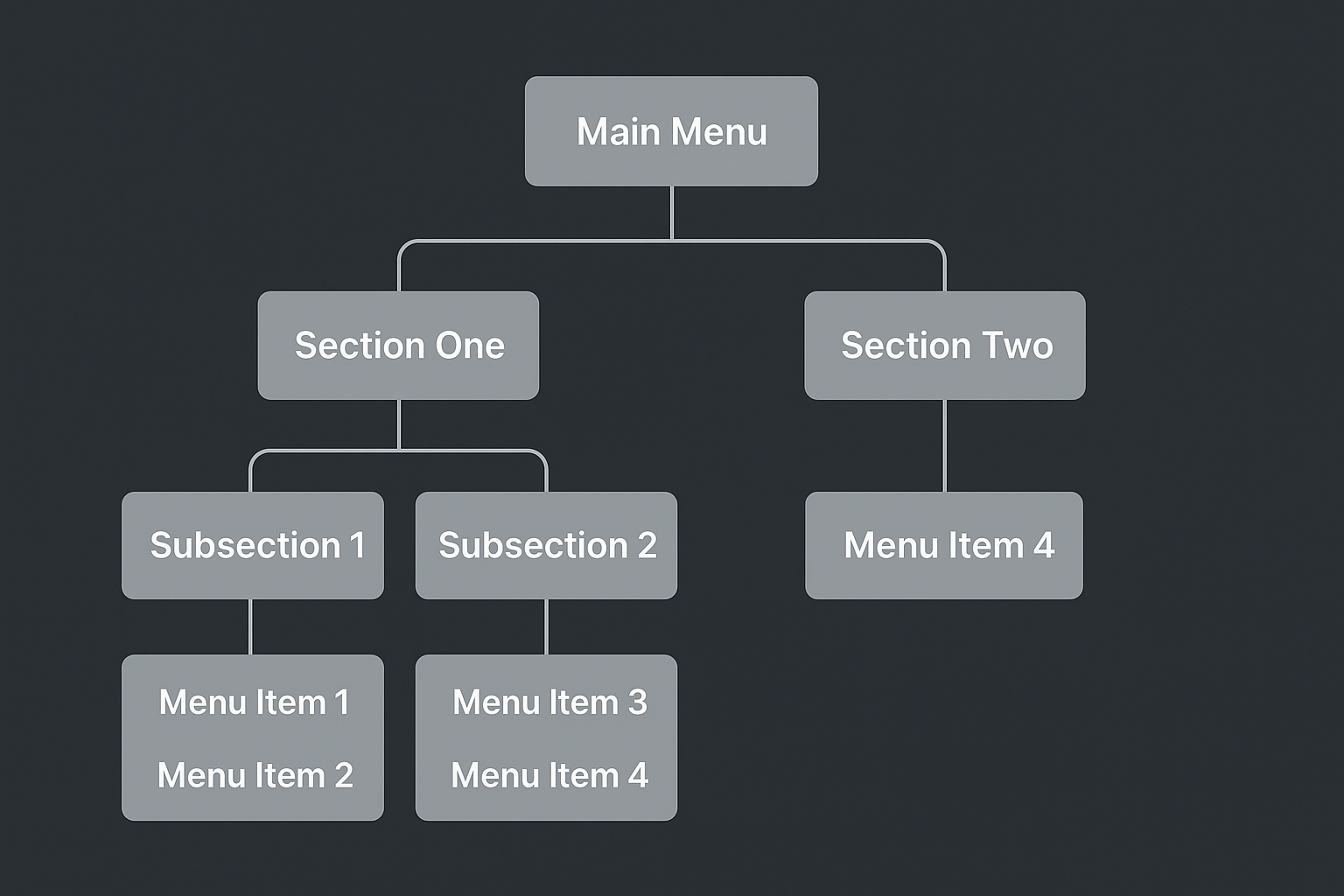
This pattern can be extended for any number of menu levels depending on your project needs.